
Sonarr: full guide
The Courmap proxy is a Torznab and Newznab indexer proxy, for torrents and usenet alike. It sits between your indexers (usually through Prowlarr) and Sonarr, resolves every anime release name with Courmap, and rewrites the ones it is sure about into the numbering Sonarr understands.
Sonarr -> Courmap proxy (/nyaa, /animetosho, /geek, ...) -> indexer feeds (torrent or usenet)What it rewrites, and what it never touches
Section titled “What it rewrites, and what it never touches”| Release | What Sonarr gets |
|---|---|
| Resolved, one episode | <your Sonarr series title> S01E17 <original quality and tags> [Group], plus the tvdbid attribute, written the way Sonarr reads it for that protocol (torznab:attr for torrents, newznab:attr for usenet) |
| A batch that is exactly one TVDB season | A season pack: <title> S01 <tags> [Group] |
| A batch inside one season | A range: <title> S01E05-E08 <tags> [Group] |
| A batch spanning seasons | Unchanged |
| Ambiguous or unmatched | Unchanged, and logged on the status page |
| A show that is not in your Sonarr | Unchanged |
| Resolved, but Courmap has no TVDB numbering for it yet | Numbered from your own Sonarr when exactly one of your series matches it and the numbering is certain (“assisted”); otherwise unchanged |
In Sonarr’s Interactive Search, the rewrite shows in the Title column: every result below is a different release of episode 3, and each carries the same S01E03.
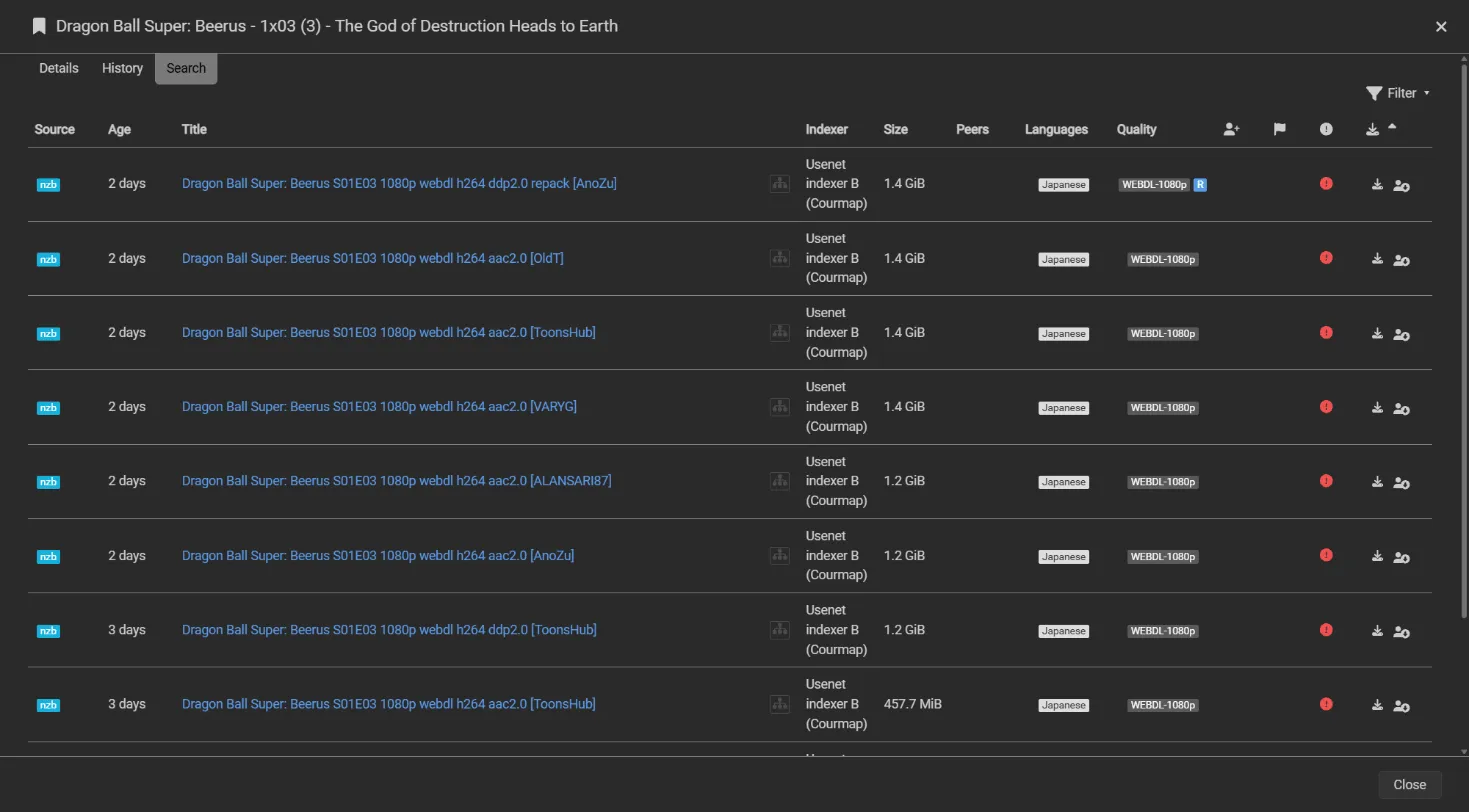
The series title comes from your own Sonarr, matched by TVDB ID, so Sonarr always recognizes it. For series where Sonarr uses scene numbering (XEM), the proxy writes the episode’s scene numbers, because that is how Sonarr reads SxxEyy for those series. Everything else in a result (the torrent or NZB enclosure and download link, size, seeders, grabs, dates, categories) reaches Sonarr unchanged.
Searches are translated too. Sonarr searches by TVDB ID, season and episode, which anime indexers do not understand. The proxy turns that into the work’s own title plus its episode number (and the franchise title plus the absolute number, when fansubs number it that way), sends those searches to Prowlarr, and rewrites the results.
Set up
Section titled “Set up”The Sonarr quickstart is the short path with Docker Compose. This page has everything else: Unraid, a different Compose project, anime-only indexers, Jackett and other feeds, a VPN container, and the details behind each setting.
-
Find each anime indexer’s ID in Prowlarr. It is the number in the indexer’s feed address,
http://prowlarr:9696/1/api. EachINDEXER_<NAME>_URLis one Prowlarr indexer’s feed, and<NAME>is a label you choose: the proxy serves it at/<name>, lowercase, with underscores turned into hyphens. For a usenet indexer, addINDEXER_<NAME>_TYPE: newznab; torrent indexers need no type, and an indexer without one is detected from its first results.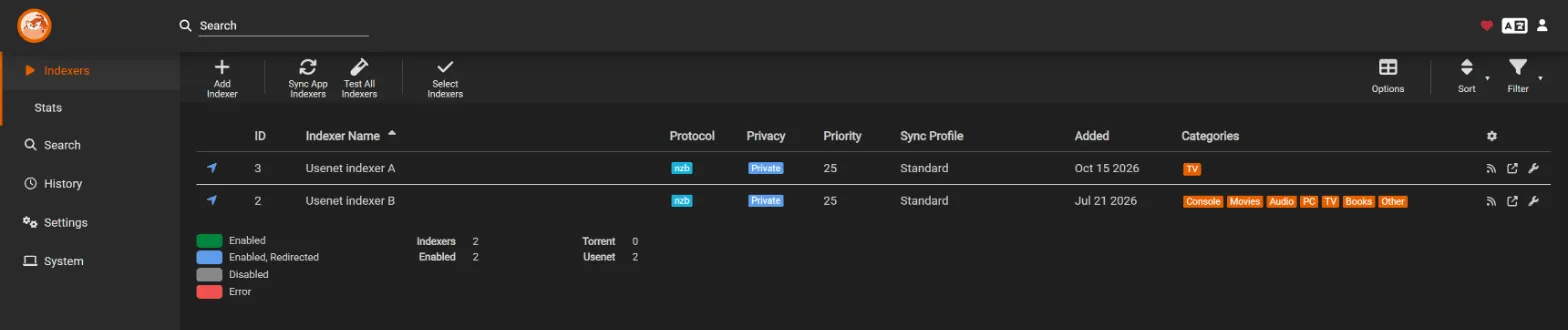
The list hides the ID by default. Turn it on under Options (the table icon at the top right), or read it from the indexer’s feed address.
-
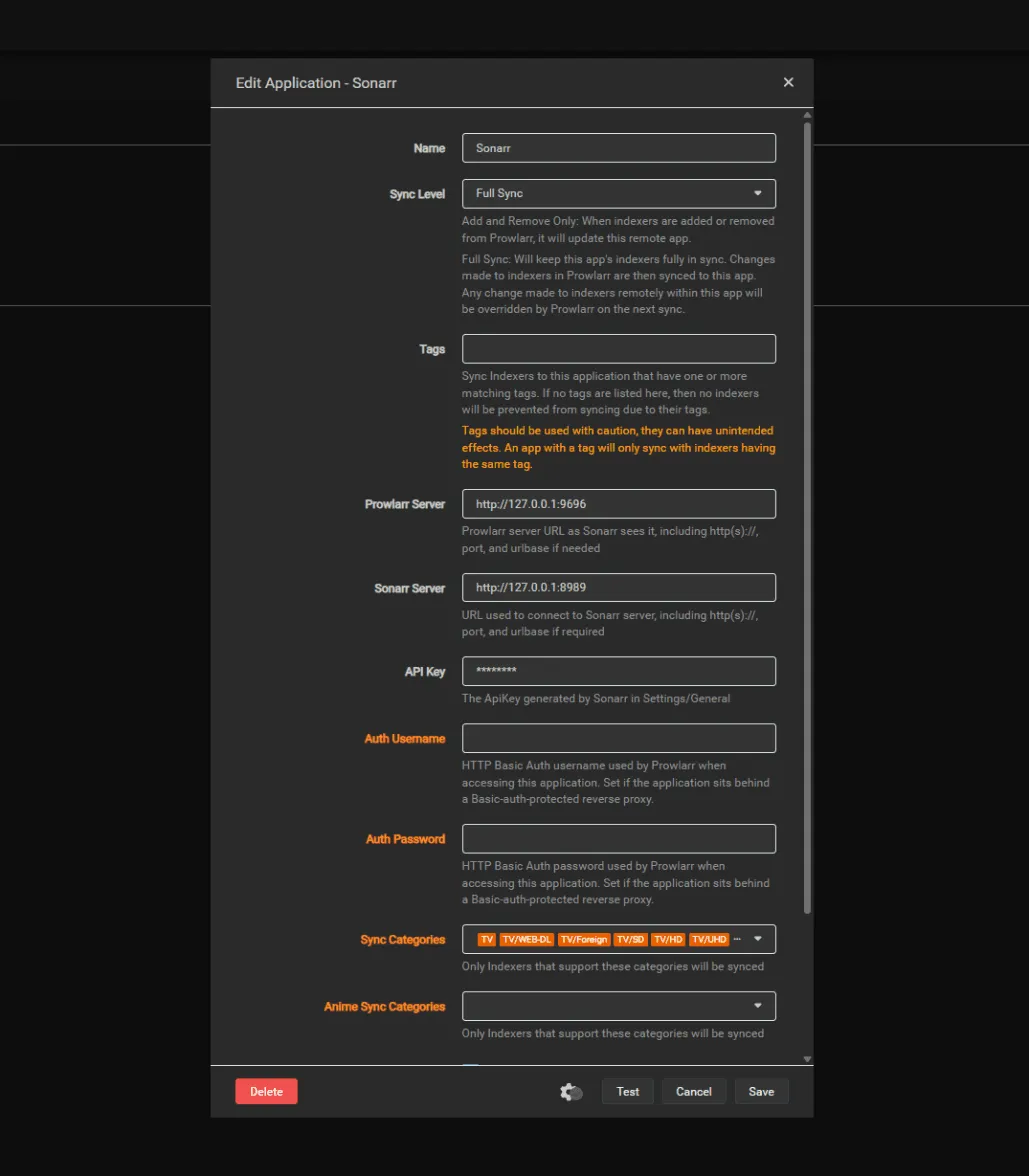
Keep Prowlarr’s own copies for regular TV. Sonarr searches standard series in an indexer’s Categories and anime series in its Anime Categories, so Prowlarr’s copy can keep handling regular TV while the Courmap copy handles anime. For an indexer that carries both, clear Anime Sync Categories in Prowlarr’s Sonarr app (Settings, Apps, Sonarr, Show Advanced), keep Full Sync and no tags, and click Sync App Indexers. For an anime-only indexer such as Nyaa, remove Prowlarr’s copy with a tag instead. The quickstart has the clicks step by step, and why. Do not change the categories of Prowlarr’s copies in Sonarr: Prowlarr rewrites them on every sync.
-
Add the proxy to Sonarr. Open Settings, then Indexers, then +, and choose Torznab under Custom for a torrent indexer, or Newznab under Custom for a usenet one. Add each indexer as the type it is: a torrent feed as Newznab, or a usenet feed as Torznab, returns results Sonarr cannot use. The settings that matter:
- URL:
http://courmap-proxy:9797/nyaa, with API Path/api - API Key: your Prowlarr API key (a usenet indexer’s own key if you proxy it directly)
- Categories: empty for an indexer that also carries regular TV (Prowlarr’s copy serves those);
5070for an anime-only indexer - Anime Categories:
5070(TV/Anime, on usenet indexers too) - Indexer Priority:
10, so the Courmap copy wins over Prowlarr’s (25) when both return the same release - Anime Standard Format Search: optional; the proxy translates both kinds of search
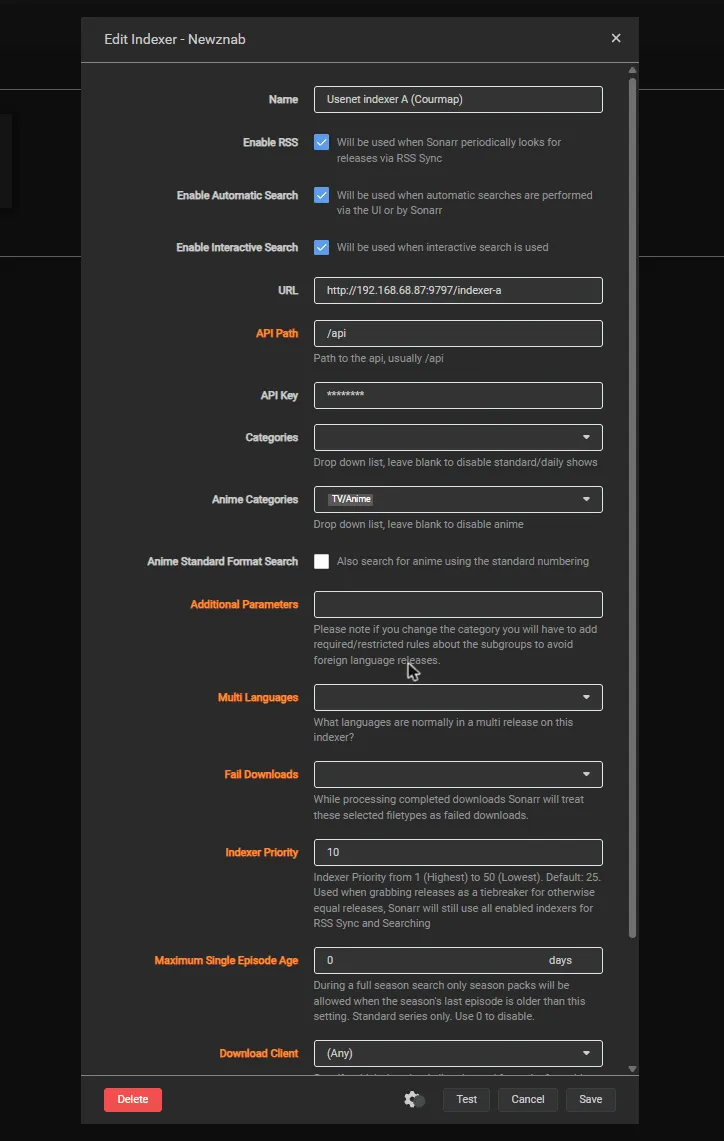
The dialog for a Newznab (usenet) indexer; Torznab has the same fields. This install uses bridge networking, so the URL is the server’s IP and port. With a shared Docker network, use container names as in the quickstart.
- URL:
-
Open the status page at
http://<your-host>:9797/and check that it shows a data version and your series count.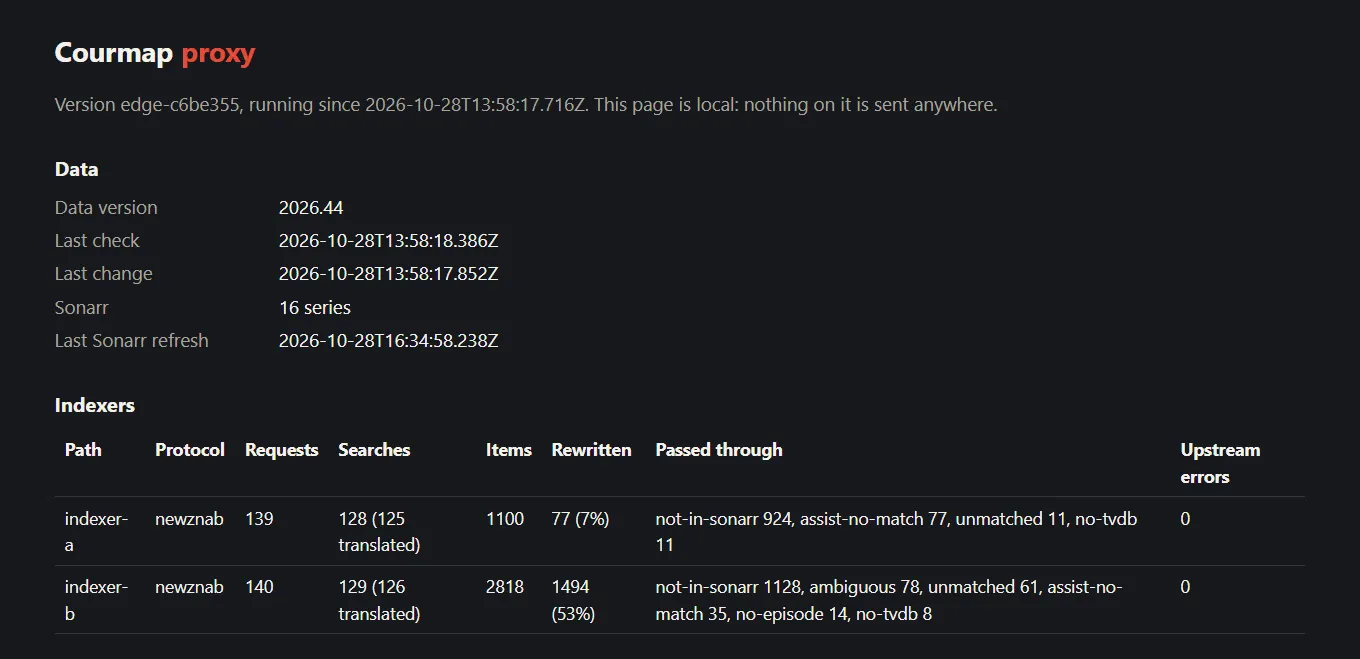
Unraid
Section titled “Unraid”-
Open the Docker tab and click Add Container. Leave Template empty, and switch on Advanced View at the top right so every field shows.
-
Fill in the form:
- Name:
courmap-proxy - Repository:
ghcr.io/courmap/proxy:latest - Network Type: the custom network your Sonarr and Prowlarr use (for example Custom: proxynet). If they run on bridge, choose bridge and use IP addresses in every URL.
- WebUI:
http://[IP]:[PORT:9797]/ - Extra Parameters:
--user 99:100, so its files belong tonobody:userslike your other appdata
- Name:
-
Click Add another Path, Port, Variable, Label or Device once for each item below, choosing the Config Type shown first:
- Port: Container Port
9797, Host Port9797(the status page). - Path: Container Path
/data, Host Path/mnt/user/appdata/courmap-proxy/data. - Path: Container Path
/config, Host Path/mnt/user/appdata/courmap-proxy/config. - Variable: Key
SONARR_URL, Valuehttp://sonarr:8989. - Variable: Key
SONARR_API_KEY, Value your Sonarr API key. - Variable: Key
INDEXER_TRACKER_URL, Valuehttp://prowlarr:9696/1/api. - Variable, only for a usenet indexer: Key
INDEXER_GEEK_URL, Valuehttp://prowlarr:9696/2/api. - Variable, only for a usenet indexer: Key
INDEXER_GEEK_TYPE, Valuenewznab.
Give each a Name you will recognize later, such as “Sonarr URL”.
- Port: Container Port
-
Click Apply. If the status page later says the data folder is not writable, run
chown -R 99:100 /mnt/user/appdata/courmap-proxyin the Unraid terminal.
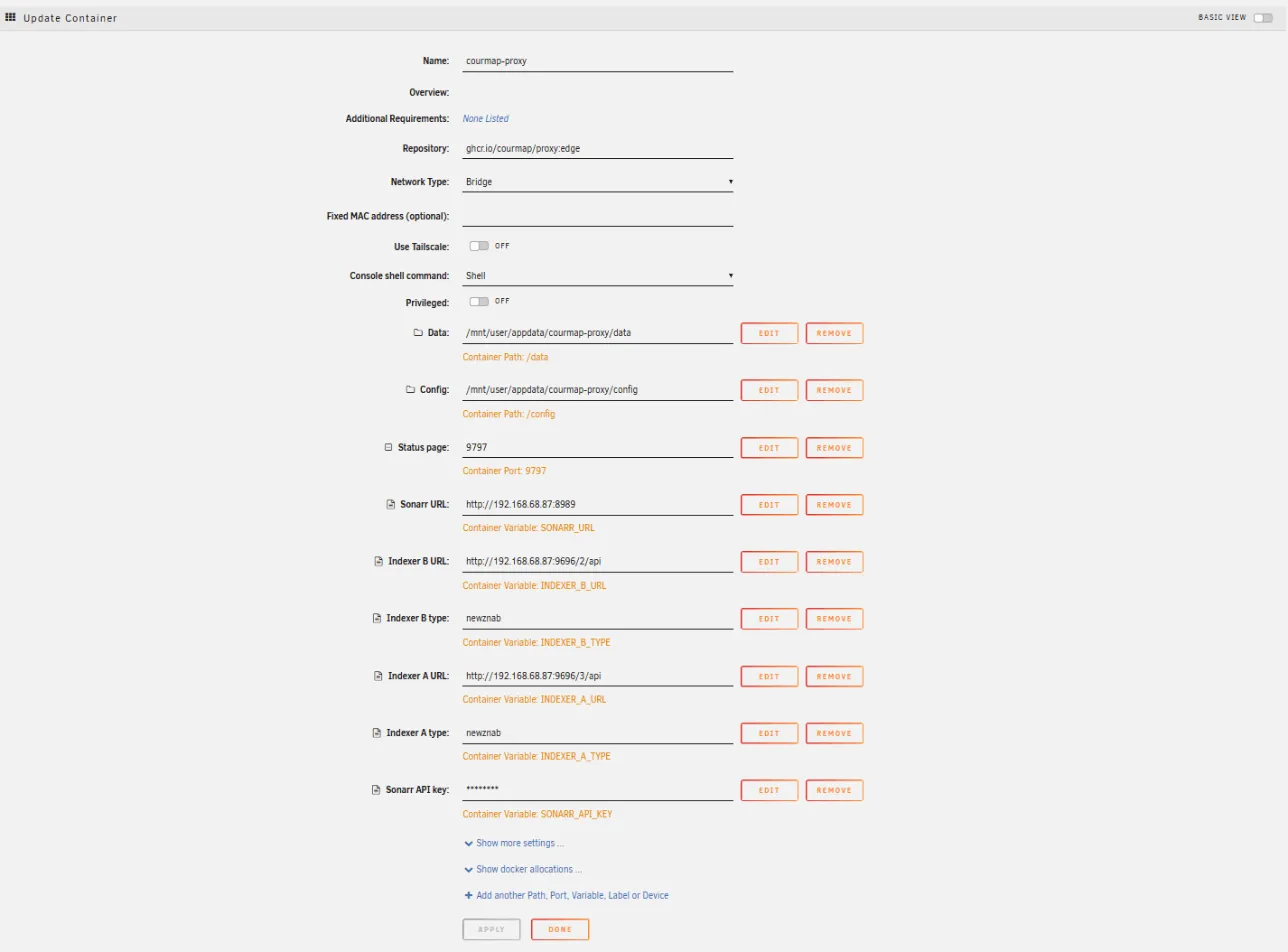
This install uses bridge networking, so the URLs are the server’s IP and ports. With a shared Docker network, use container names as in the quickstart.
Image tags
Section titled “Image tags”ghcr.io/courmap/proxy:latestis the newest release. Use it unless you have a reason not to.ghcr.io/courmap/proxy:0.1.0pins that release. Change the number to move to a later one.ghcr.io/courmap/proxy:edgefollows the main branch, for testers. Every build also gets asha-<commit>tag (the status page showsedge-plus the same seven characters), which pins one build.
The proxy downloads new data on its own every 24 hours (see REFRESH_HOURS), but the container does not update itself. To get a new proxy version, update it from the Unraid Docker tab, or run docker compose pull and docker compose up -d. Automatic container updates are fine on :latest but not recommended on :edge, which can change on any commit.
Compose in a different project
Section titled “Compose in a different project”If Sonarr and Prowlarr live in a different Compose project, the proxy has to join their network. docker inspect sonarr --format '{{range $name, $_ := .NetworkSettings.Networks}}{{$name}} {{end}}' prints its name; put that name in place of media_default below:
services:  courmap-proxy:    image: ghcr.io/courmap/proxy:latest    container_name: courmap-proxy    restart: unless-stopped    ports:      - "9797:9797"    volumes:      - ./courmap/data:/data      - ./courmap/config:/config    environment:      SONARR_URL: http://sonarr:8989      SONARR_API_KEY: your-sonarr-api-key      INDEXER_TRACKER_URL: http://prowlarr:9696/1/api    networks: [arr]
networks:  arr:    external: true    name: media_default   # the network Sonarr and Prowlarr are on
Categories and Indexer Priority
Section titled “Categories and Indexer Priority”5070 is the standard Torznab and Newznab category number for TV/Anime, which anime releases are filed under. Sonarr searches Anime Categories for series whose type is Anime and Categories for the rest, and an empty list means that kind of series is not searched at this indexer (Sonarr accepts an empty Categories as long as Anime Categories is set). So an empty Categories on the Courmap copy keeps it for anime only, and regular series are still searched at Prowlarr’s copy of the same indexer. Indexer Priority 10 beats Prowlarr’s 25 when both copies return the same release.
An indexer that carries only anime has no Prowlarr copy to serve regular series (see below), so its Courmap copy also takes 5070 in Categories.
Anime-only indexers
Section titled “Anime-only indexers”Clearing Anime Sync Categories does not remove an anime-only indexer such as Nyaa or AnimeTosho from Sonarr, because its anime category sits under the TV category. Remove its copy with a tag instead. Prowlarr’s app tags only include indexers (an app with tags receives just the indexers sharing one of them), so tag the indexers that should keep a copy, and the app:
-
In Prowlarr, open Indexers. For each indexer Sonarr should still get directly (the ones that also carry regular TV), click it, type
sonarrin Tags, press Enter, and click Save. Leave the anime-only indexers untagged. -
Open Settings, then Apps, then your Sonarr app. Type
sonarrin Tags, check that Sync Level is Full Sync, and click Save. -
Back on Indexers, click Sync App Indexers. Prowlarr removes from Sonarr every indexer without the
sonarrtag. -
In Sonarr, open Settings, then Indexers, and check that the “(Prowlarr)” copies of your anime-only indexers are gone.
If you have both kinds of indexer, do both: clear Anime Sync Categories, tag the indexers that carry regular TV, and tag the app. With only anime-only indexers, tag the app and no indexer. Then add the Courmap copy of an anime-only indexer with Categories 5070 and Anime Categories 5070.
Not using Prowlarr?
Section titled “Not using Prowlarr?”The proxy is not tied to Prowlarr: it sits in front of any Torznab or Newznab feed. Sonarr’s request goes to the address in INDEXER_<NAME>_URL with Sonarr’s query and API key added, and the results come back rewritten.
- Jackett works. This setup was tested end to end on 2026-10-19 with Jackett, Sonarr 4.0.20 and the proxy image: Sonarr’s indexer test passed, its TVDB searches were translated into title searches Jackett understands, and
[Erai-raws] Spy x Family Season 2 - 05 [1080p]...reached Sonarr asSPY x FAMILY S02E05 [1080p] ... -Erai-raws. What changes from the quickstart:-
The feed address. In Jackett, click Copy Torznab Feed on the indexer’s row and add
apito the end, so Nyaa becomes:INDEXER_NYAA_URL: http://jackett:9117/api/v2.0/indexers/nyaasi/results/torznab/api -
The API key. In Sonarr’s indexer, API Key is your Jackett API key (shown at the top of the Jackett dashboard). The proxy passes it on to Jackett.
-
Keeping Prowlarr’s copies is simpler. Jackett does not sync anything to Sonarr, so there is nothing in Jackett to change. For an indexer that also carries regular TV, keep the copy you added to Sonarr from Jackett and clear its Anime Categories; for an anime-only indexer, delete (or disable) it.
-
Leave Jackett’s title tweaks off. Some Jackett indexers offer to “improve Sonarr compatibility” by adding season information to titles. Keep that off for indexers behind the proxy: Courmap resolves the original name.
-
- Another Torznab feed, such as a tracker’s own Torznab API, works the same way: put its address in
INDEXER_<NAME>_URL. If it needs a key other than the one Sonarr sends, setINDEXER_<NAME>_APIKEY. - Sonarr’s built-in Nyaa indexer cannot go through the proxy: it reads Nyaa’s own RSS feed, not Torznab, so there is nothing for the proxy to sit in front of. Add Prowlarr or Jackett to use Courmap.
- Usenet (Newznab) indexers work the same way, straight from the indexer if you like: set
INDEXER_<NAME>_URLto its API address (for NZBgeek that ishttps://api.nzbgeek.info/api, the base address plus/api),INDEXER_<NAME>_TYPEtonewznab, and use the indexer’s own API key in Sonarr. - Sonarr’s built-in Fanzub indexer is its own type, neither Torznab nor Newznab, so it cannot go through the proxy.
Settings
Section titled “Settings”| Variable | Default | Meaning |
|---|---|---|
SONARR_URL, SONARR_API_KEY |
none | Your Sonarr. Without them every release passes through unchanged. |
INDEXER_<NAME>_URL |
none | An upstream Torznab or Newznab feed, served at /<name> (lowercase, underscores become hyphens). |
INDEXER_<NAME>_TYPE |
detected | torznab (torrents) or newznab (usenet). When unset, the proxy learns it from the feed’s first results. A type that disagrees with the feed is flagged on the status page. |
INDEXER_<NAME>_APIKEY |
none | The upstream key, if you would rather not use the one Sonarr sends. |
COURMAP_DUMP |
none | A fixed local dump; the proxy then never downloads data. |
COURMAP_META_URL |
the latest GitHub data release | Where the current data version and dump are announced. |
REFRESH_HOURS |
24 |
How often the data release is checked. A new dump is downloaded only when the data version changes, and its SHA-256 is checked before it replaces the old one. |
SONARR_REFRESH_MINUTES |
60 |
How often the series list is reloaded. It is also reloaded automatically, at most once a minute, when a release or a search needs a show that is not in the list, so a series you just added is picked up without waiting. The status page shows the Last Sonarr refresh. |
PORT, DATA_DIR, TIMEOUT_SECONDS |
9797, /data, 60 |
Port, data folder and upstream timeout. |
UPSTREAM_CACHE_SECONDS |
60 |
Identical queries to an indexer within this time share one request. 0 turns the cache off. See Indexer API limits. |
SEARCH_STOP_ON_MATCH |
true |
An episode search sends its alternative query only when the first one did not return that episode. false always sends both. |
MAX_QUERIES_PER_SEARCH |
3 |
The most queries one Sonarr search may send to an indexer (1 to 10). |
An optional YAML file at /config/courmap-proxy.yaml can hold the same settings (type: newznab on an indexer entry); environment variables win over it.
Indexer API limits
Section titled “Indexer API limits”Usenet indexers, and some torrent ones, allow only a limited number of API requests a day, so the proxy is careful with them and shows what it spends.
What one Sonarr search costs. Sonarr asks an indexer for one episode in several ways, and the proxy turns each into the indexer’s own kind of text search. Counted at the indexer, against a real Sonarr:
| Sonarr search | Requests that reached the indexer without the cache and early stop | With them (the defaults) |
|---|---|---|
| Episode search, the episode has two names (its own number and the absolute one) | 10 | 1 |
| Episode search, one name | 8 | 1 |
| Season search of an anime series | 190 | 37 |
Three things bring that down:
- The cache. Identical queries within
UPSTREAM_CACHE_SECONDS(60) share one request, also while the first is still running. An answer that failed is never kept, so the next request tries again. Answers from the cache are rewritten fresh each time, so new data applies at once. - Stopping early. An episode search asks first with the work’s own title and number. The same episode under another name (the franchise title with the absolute number) is sent only when that first answer had no release for the episode. The trade: when the first query already found it, you do not see releases that are named only the other way. Set
SEARCH_STOP_ON_MATCH=falseto always send both. A season search asks about different works, so it always sends all its queries. - The cap.
MAX_QUERIES_PER_SEARCH(3) limits the queries one search may send.
A season search of an anime series stays expensive: Sonarr looks for each episode by itself, so it costs about one request per episode. On a tight limit, search the episodes you need, or let RSS find new ones.
What the status page shows. Under “Requests to your indexers, per day”: for each indexer, the requests sent on each of the last seven UTC days, with the cache’s answers and the failures beside them. The counts are kept for two weeks and survive a restart. Compare them with your plan’s limit (check when the indexer resets it; it is often midnight UTC).
When an indexer says its limit is reached. The proxy does not retry and does not keep the answer. It passes the indexer’s answer to Sonarr as it is (an error document with HTTP 200, or HTTP 429 with its Retry-After), shows the reason in that indexer’s row (api-limit), and logs it at most once a minute. What follows is Sonarr’s doing: for “Request limit reached” or HTTP 429 it disables the indexer for the time the indexer asked, or for at least an hour. Other wordings, such as “Daily hits limit reached”, are ordinary failures to Sonarr, which backs off with its usual growing delay. A request that failed still counted against the indexer’s limit.
Behind a VPN container
Section titled “Behind a VPN container”Some setups run Sonarr and Prowlarr inside a VPN container’s network, for example gluetun (Compose: network_mode: "service:gluetun"; Unraid: Network Type None and --net=container:gluetun in Extra Parameters). They then have no container names of their own: they live inside the VPN container, so http://sonarr:8989 and http://prowlarr:9696 do not resolve from the proxy, and http://courmap-proxy:9797 does not resolve from Sonarr. The fix is to use your host’s LAN address everywhere.
The proxy itself needs no VPN. It talks only to your Sonarr and Prowlarr on your own network, and to GitHub for the weekly data release. Your indexer traffic still goes from Prowlarr through the VPN, as before.
-
Run the proxy on a normal (bridge) network, not in the VPN container’s. The Unraid steps on this page and the Compose step in the quickstart stay as they are, except for the addresses below.
-
Publish Sonarr’s and Prowlarr’s ports on the VPN container. Containers that share its network cannot publish ports of their own, so for gluetun add
8989:8989and9696:9696under itsports(or as Port entries on its Unraid container). Check thathttp://<host LAN IP>:8989andhttp://<host LAN IP>:9696open in a browser. -
Let the VPN container reach your LAN. gluetun blocks everything outside the VPN by default; its
FIREWALL_OUTBOUND_SUBNETSsetting lists the subnets that gluetun and the containers sharing its network may reach. Set it to your LAN, for example192.168.1.0/24, so Sonarr and Prowlarr can reach the proxy. -
Use the host’s LAN IP in all three places (here
192.168.1.10):Where Setting Value Proxy SONARR_URLhttp://192.168.1.10:8989Proxy INDEXER_NYAA_URLhttp://192.168.1.10:9696/1/apiSonarr, the indexer’s URL URL http://192.168.1.10:9797/nyaa
Prowlarr’s own Sonarr app needs no change: Sonarr and Prowlarr share one network inside the VPN container, so their addresses for each other (http://localhost:8989 and http://localhost:9696) stay as they are.
The status page
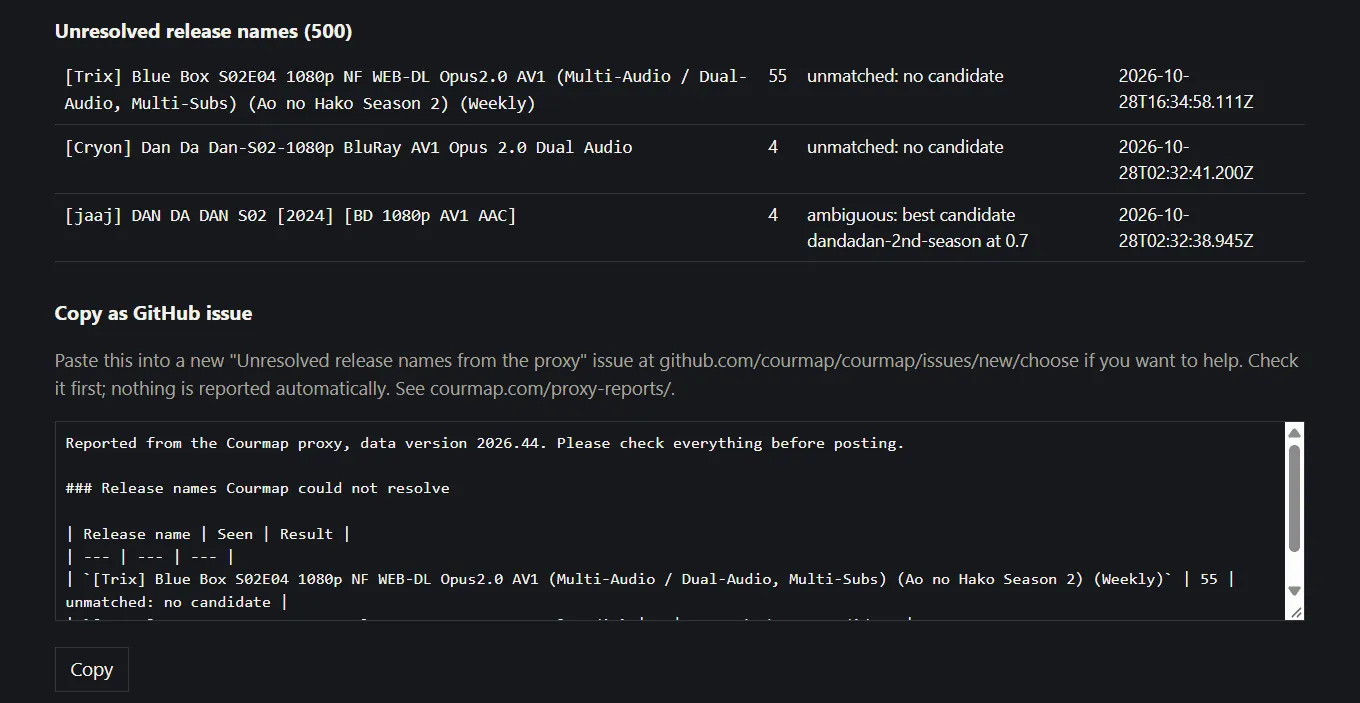
Section titled “The status page”http://<your-host>:9797/ shows the data version and its last refresh, the Sonarr connection, and per indexer its protocol (torznab or newznab, as set or detected), how many requests, searches and results it saw, how many results it rewrote, and why the rest passed through. Below that are the works numbered with your Sonarr’s help (“assisted”) and the release names Courmap could not resolve, with a block of text you can paste into a GitHub issue to help improve the data: assisted works appear in it as ready-made mapping files. To report them, press Copy and open an “Unresolved release names from the proxy” issue; Turning proxy reports into data says how to title it and what a maintainer does with it. Nothing on the page is sent anywhere.
API keys
Section titled “API keys”The proxy never writes an API key to its logs, its status page or its exports: a key shows as ***, even inside an error message. That covers your Sonarr key, an indexer key set with INDEXER_<NAME>_APIKEY, and any apikey= in a feed address. Release names are shown as they were, so read a report before you post it.
Troubleshooting
Section titled “Troubleshooting”- The status page shows upstream errors. The row says how many and why:
api-limit(the indexer’s quota is spent, or HTTP 429),auth(the indexer rejected the API key),indexer-error(any other error document),http(another HTTP error, such as 503),bad-response(an answer that is not a feed, such as a maintenance page),timeout(no answer inTIMEOUT_SECONDS) andnetwork(could not connect). The latest one is spelled out under the table. - The status page says no data is loaded. The proxy downloads the latest data release from GitHub on start; check that the container can reach
github.com, or setCOURMAP_DUMPto a local dump. If GitHub is the problem, check status.courmap.com; a proxy that already downloaded data keeps using it. - “The data folder is not writable”. On Unraid, run
chown -R 99:100 /mnt/user/appdata/courmap-proxy. - Sonarr’s test fails with HTTP 401. The API key Sonarr sends is passed to Prowlarr; use the Prowlarr API key, not Sonarr’s.
- Sonarr’s log says “did you intend to add a Torznab indexer?”. A torrent feed was added to Sonarr as a Newznab indexer; add torrent feeds as Torznab.
- The status page says “feed looks like newznab” (or torznab).
INDEXER_<NAME>_TYPEdisagrees with the indexer’s results; correct it, or remove it to let the proxy detect the type. - A release arrives twice, or an anime release was grabbed under its original name. Prowlarr’s copy of the indexer still returns anime releases from the TV category. Give the Courmap copy a lower Indexer Priority than Prowlarr’s (10 against 25), clear Anime Sync Categories in Prowlarr, and remove the Prowlarr copy of an anime-only indexer; see step 2 of Set up.
- Sonarr’s test fails with “Unable to connect” and Sonarr runs behind a VPN container. The VPN container is blocking the LAN. Set its
FIREWALL_OUTBOUND_SUBNETSto your LAN (see Behind a VPN container). - Sonarr cannot reach
courmap-proxy. The containers are not on one network; use IP addresses instead of container names. - The proxy refuses to start with “url must start with http://”. An
INDEXER_<NAME>_URLvalue is missing itshttp://orhttps://. - Just added a series? The proxy reloads your Sonarr series list when a release or a search needs a show it does not have, at most once a minute. A search (an Interactive Search, say) reloads straight away and is translated at once. An RSS release that arrives first passes through unchanged, and the next one is rewritten. The status page’s Last Sonarr refresh shows when the list was last read, and Sonarr how many series it holds. If the series still does not appear, check the Sonarr error line (a wrong
SONARR_URLorSONARR_API_KEY), and that the series has a TVDB ID in Sonarr. - A release is not rewritten. The status page lists why: not resolved, no TVDB mapping, a show that is not in your Sonarr, or a batch spanning seasons. Unresolved names make good bug reports.
This product uses the TMDB API but is not endorsed or certified by TMDB.