
Sonarr quickstart
Get anime episodes grabbed and imported as the right episode in a few minutes. The proxy sits between Prowlarr and Sonarr and rewrites a release only when it is sure about it. When it is not sure, it passes the release through unchanged, so Sonarr never does worse than it does today.
Sonarr -> Courmap proxy -> Prowlarr -> indexersThis page is the short path: Docker Compose, Prowlarr, one torrent indexer and one usenet indexer, both of which also carry regular TV. Unraid, anime-only indexers such as Nyaa, Jackett and a VPN container are in the full guide.
Before you start
Section titled “Before you start”You need Docker with Compose, Sonarr v4 and Prowlarr, on the same Docker network. Then collect:
-
Your Sonarr API key. In Sonarr, open Settings, then General. Under Security, copy API Key. It goes into the proxy.
-
Your Prowlarr API key. In Prowlarr, open Settings, then General. Under Security, copy API Key. It goes into Sonarr.
-
The Prowlarr ID of each indexer. Prowlarr serves every indexer as its own feed at
http://prowlarr:9696/<ID>/api. In Sonarr, open Settings, then Indexers, and open an indexer whose name ends in “(Prowlarr)”: the number in its URL is the ID (http://prowlarr:9696/1/means ID1). Not listed there? Ask Prowlarr:curl -s "http://<prowlarr-host>:9696/api/v1/indexer?apikey=<prowlarr-api-key>"shows each"id"next to its"name".
1. Run the proxy
Section titled “1. Run the proxy”You add one INDEXER_<NAME>_URL setting per indexer. <NAME> is a label you choose, written in capital letters, digits and underscores. It is not the Prowlarr ID. The proxy lowercases it and turns underscores into hyphens, and the result is the path Sonarr will use. The Prowlarr ID goes inside the value. A usenet indexer also takes INDEXER_<NAME>_TYPE set to newznab; torrent indexers need none.
| Setting | Value | Address Sonarr uses |
|---|---|---|
INDEXER_TRACKER_URL |
http://prowlarr:9696/1/api |
http://courmap-proxy:9797/tracker |
INDEXER_GEEK_URL |
http://prowlarr:9696/2/api |
http://courmap-proxy:9797/geek |
INDEXER_GEEK_TYPE |
newznab |
Add this service next to Sonarr and Prowlarr, in the same Compose file so it joins their network:
services:  courmap-proxy:    image: ghcr.io/courmap/proxy:latest    container_name: courmap-proxy    restart: unless-stopped    ports:      - "9797:9797"                # the status page    volumes:      - ./courmap/data:/data       # downloaded data and the list of names it could not resolve      - ./courmap/config:/config   # optional: a courmap-proxy.yaml with the same settings    environment:      SONARR_URL: http://sonarr:8989      SONARR_API_KEY: your-sonarr-api-key        # Sonarr's key goes here, not Prowlarr's
      # One line per indexer. TRACKER and GEEK are labels you choose; they become /tracker and /geek.      # The number in the URL is the indexer's ID in Prowlarr.      INDEXER_TRACKER_URL: http://prowlarr:9696/1/api      INDEXER_GEEK_URL: http://prowlarr:9696/2/api      INDEXER_GEEK_TYPE: newznab                 # usenet only
Start it with docker compose up -d courmap-proxy. See image tags for pinning a version. Open http://<your-host>:9797/: within a minute it shows a Data version and how many Sonarr series it found.
2. Add each proxy path to Sonarr
Section titled “2. Add each proxy path to Sonarr”Torrent and usenet indexers are added as different types, so pick your tab. Choosing the wrong type gives results Sonarr cannot use.
-
In Sonarr, open Settings, then Indexers, click +, and choose Torznab under Custom.
-
Fill in:
- Name:
Tracker (Courmap) - URL:
http://courmap-proxy:9797/tracker - API Path:
/api - API Key: your Prowlarr API key
- Categories: leave empty
- Anime Categories:
5070 - Indexer Priority:
10
5070is the TV/Anime category. Sonarr searches Anime Categories for anime series and Categories for the rest, so this copy handles anime and Prowlarr’s copy keeps regular TV. Priority 10 beats Prowlarr’s 25 when both return the same release. Why, and what to do for an anime-only indexer. - Name:
-
Click Test. A green check means Sonarr reached Prowlarr through the proxy. Click Save.
-
In Sonarr, open Settings, then Indexers, click +, and choose Newznab under Custom. (The named presets, such as NZBgeek, connect straight to the indexer; Custom lets you point it at the proxy.)
-
Fill in:
- Name:
Geek (Courmap) - URL:
http://courmap-proxy:9797/geek - API Path:
/api - API Key: your Prowlarr API key (or the usenet indexer’s own key if you proxy it directly)
- Categories: leave empty (clear Sonarr’s default 5030 and 5040)
- Anime Categories:
5070 - Indexer Priority:
10
The same rule applies: an empty Categories keeps this copy for anime, and Prowlarr’s copy keeps regular TV.
- Name:
-
Click Test, then Save.
NZB downloads do not go through the proxy: each result’s download link still points at the indexer.
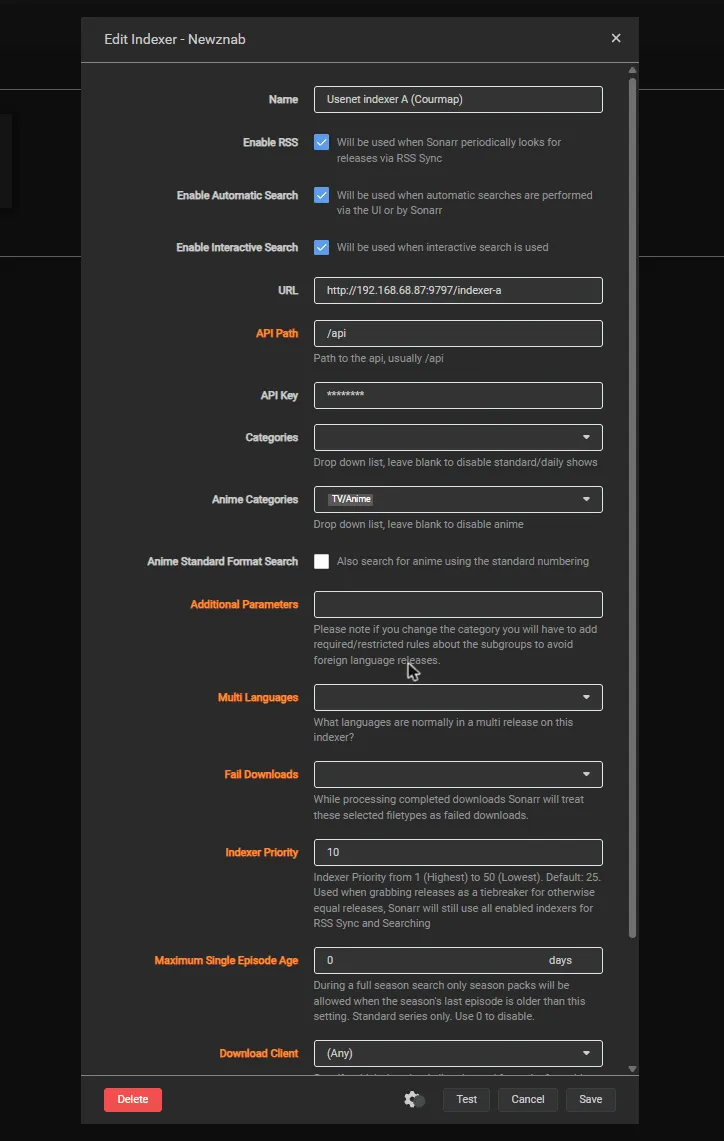
Torznab has the same fields. This install uses bridge networking, so its URL is the server’s IP and port; on a shared Docker network, use the container name as above.
3. Keep Prowlarr’s copies for regular TV
Section titled “3. Keep Prowlarr’s copies for regular TV”Leave Prowlarr’s Sonarr app on Full Sync with no tags, and take anime out of what it sends to Sonarr:
-
In Prowlarr, open Settings, then Apps, then your Sonarr app, and turn on Show Advanced.
-
Clear Anime Sync Categories (remove
5070). Leave Sync Categories and Sync Level (Full Sync) as they are, and click Save. -
Back on Indexers, click Sync App Indexers.
-
In Sonarr, open one of the “(Prowlarr)” copies: its Anime Categories is now empty. Do not change categories there yourself, because Prowlarr rewrites them on every sync.
Prowlarr’s copy now searches regular series only. Its RSS feed can still return an anime release under its original name, which is why the Courmap copy has the higher priority: when Sonarr has the same release twice, it takes the rewritten one. Have an anime-only indexer such as Nyaa? Clearing the category does not remove its Prowlarr copy; use the tag method.
4. Check that it works
Section titled “4. Check that it works”Open an anime series in Sonarr that has a few episodes out, and click the person icon on an episode’s row (Interactive Search). Results from your Courmap indexers show rewritten titles, built from the series title in your own Sonarr:
| The indexer’s original name | What Sonarr shows |
|---|---|
[SubsPlease] Spy x Family - 17 (1080p) [ABCD1234].mkv |
Spy x Family S01E17 (1080p) [ABCD1234] [SubsPlease] |
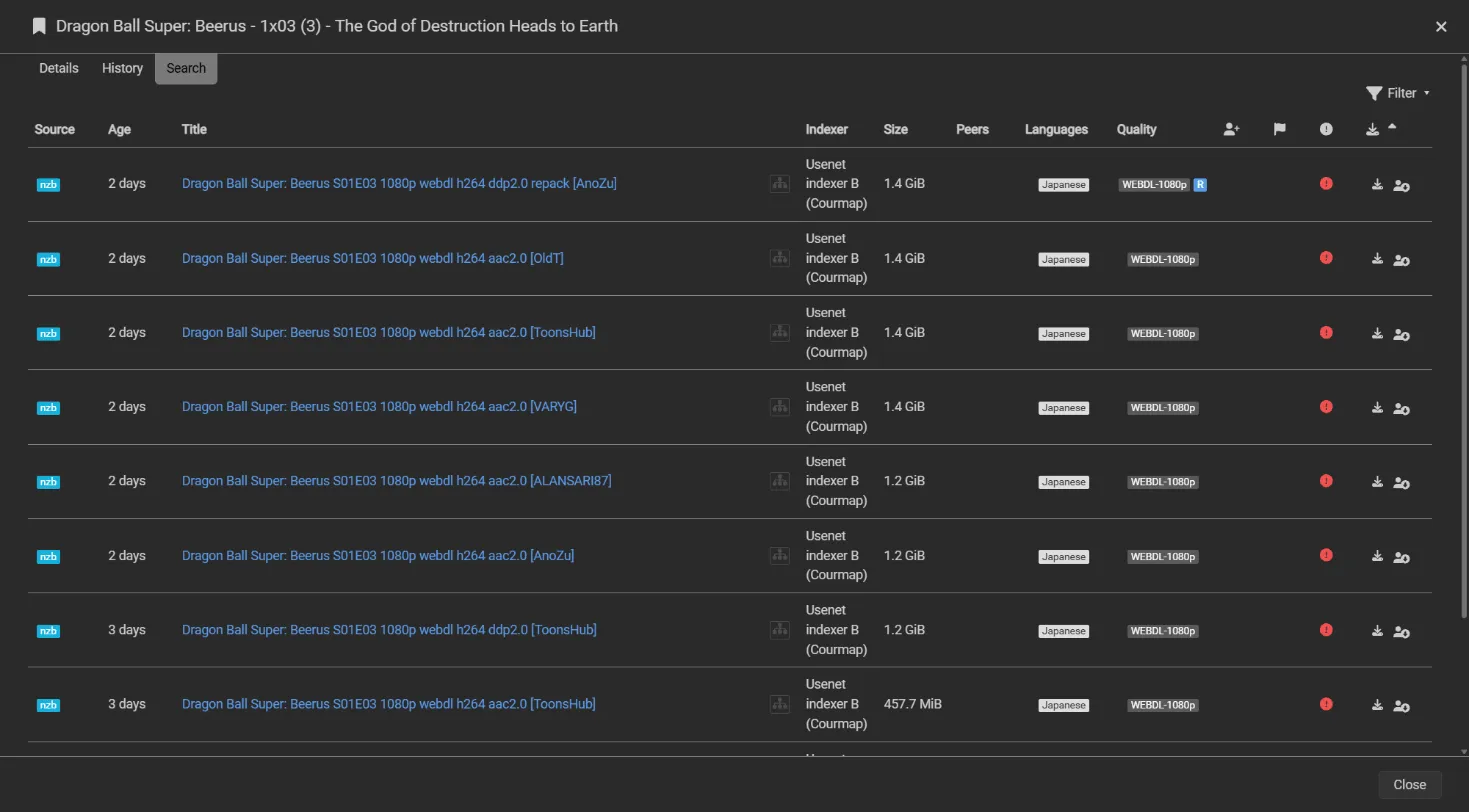
A release Courmap was not sure about keeps its original name, so Sonarr treats it exactly as it would without the proxy.
What success looks like
Section titled “What success looks like”On the status page (http://<your-host>:9797/):
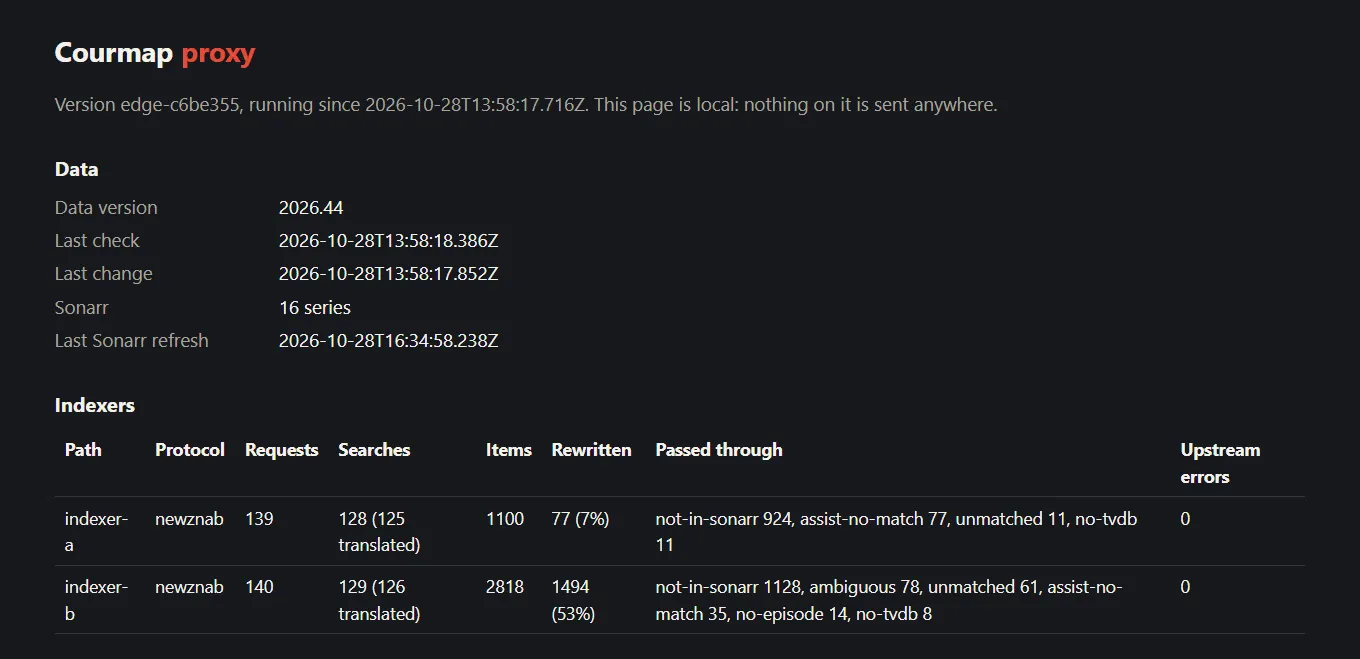
- Data shows a data version and your Sonarr series count.
- Indexers has one row per path (
geek,tracker) with its Protocol, Requests counting up as Sonarr’s RSS sync runs, Rewritten with the share of results renumbered, and Passed through with the reasons for the rest. - A regular (Standard) series adds nothing to the Requests of your Courmap indexers in an Interactive Search, and an Anime series does. If a Standard series does, check that Categories is empty on the Courmap copy.
The full Sonarr guide covers Unraid, a different Compose project, anime-only indexers, Jackett and other feeds, a VPN container such as gluetun, indexer API limits, every setting and troubleshooting.
This product uses the TMDB API but is not endorsed or certified by TMDB.